Features

Everything your crew needs, in one living studio

Live project activity, AI agents, games, offices, a world builder and spatial voice, in a place you can walk around. Every picture on this page is the real app.

The four big ideas

Live project activity

Your work lights up the room

Connect GitHub, GitLab, Vercel, Coolify, Linear, Jira or any webhook. A deploy launches a rocket, a success pops confetti and a broken build smokes, right on the project station.

  • Stations that reactEach shared project gets a station that shows it reviewing, deploying, failing, celebrating or in an incident.
  • Moments everyone seesA push pulses, a merge pops confetti, a release sets off fireworks. Outages are never played for laughs.
  • Metadata, never codeDevSyncora never reads your code. Only what happened arrives, for exactly the people allowed to see it.
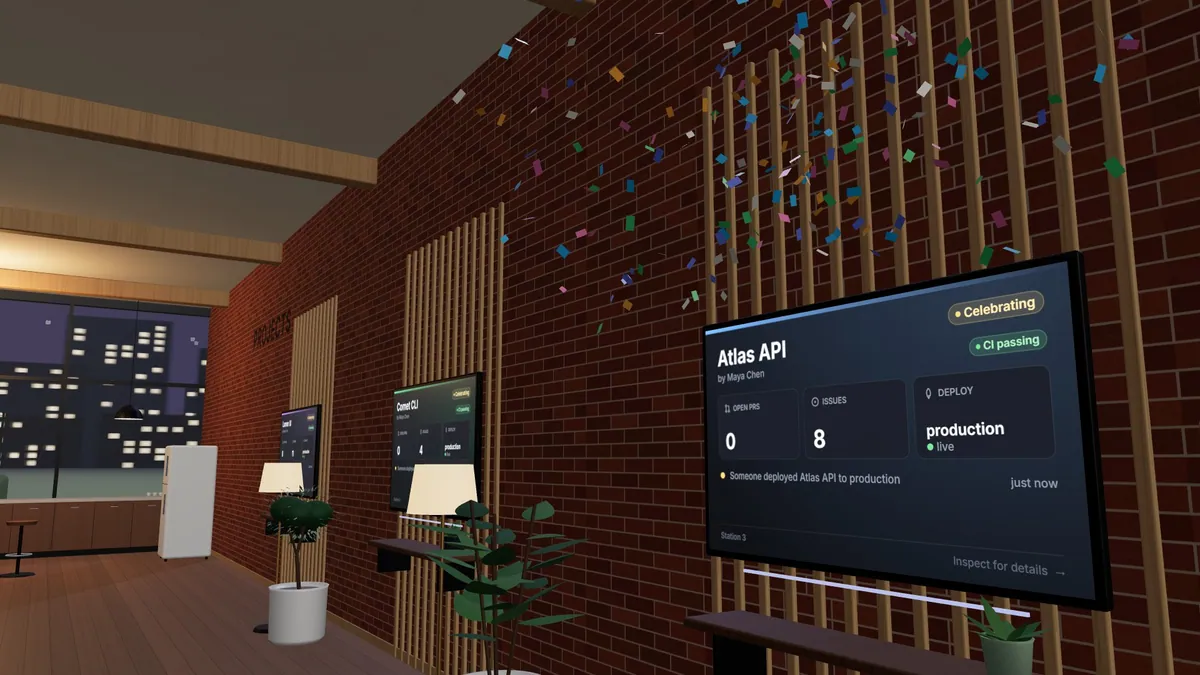
Deploys reaching two project stations: a rocket on start, confetti on success, and smoke when a deploy fails.

AI agents

Agents with desks of their own

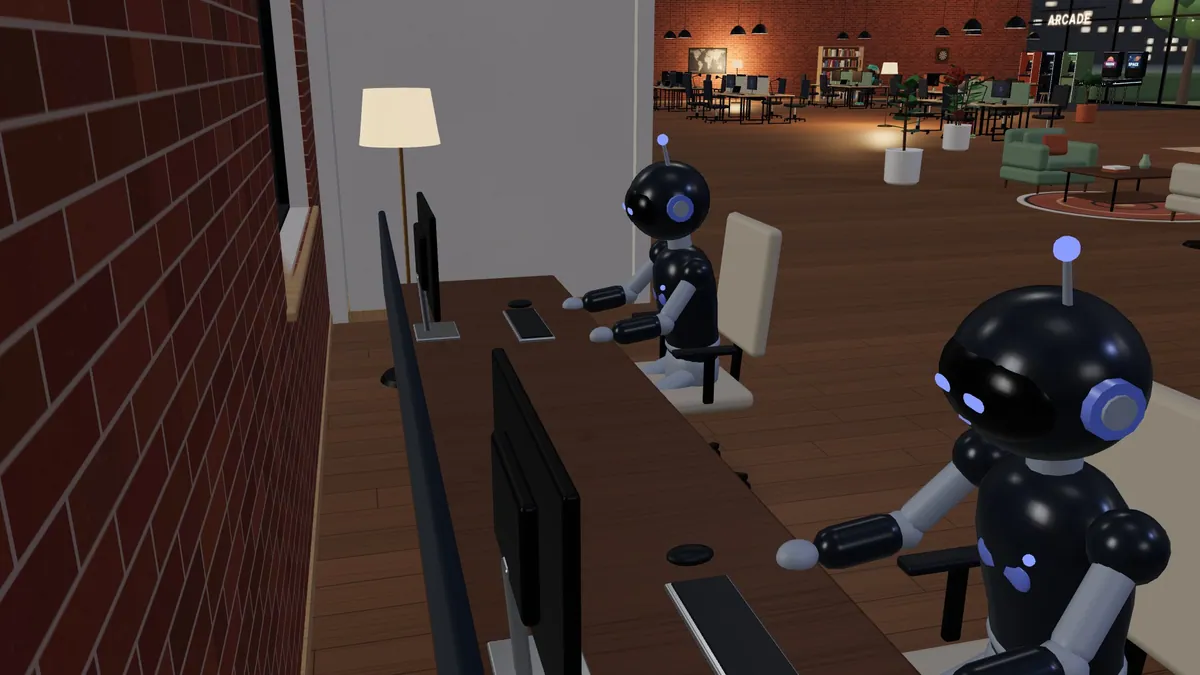
Send an agent to look into something. It walks to its workstation, types while it works and comes back to your desk when it is done or needs you.

  • The world never fakes workA worker only moves when its run changes: queued, working, waiting for you, done or failed.
  • Talk to themWalk up and talk. Standard voice uses your browser's speech, free; HD voice that everyone nearby hears comes with Plus and Pro, later.
  • Your own subscriptionThe DevSyncora Bridge runs your own Claude Code or Codex on your computer, in folders you link, under the plan you already pay for.
Two AI agents typing at their own workstations in the agent bay.

Games and emotes

Play between deploys

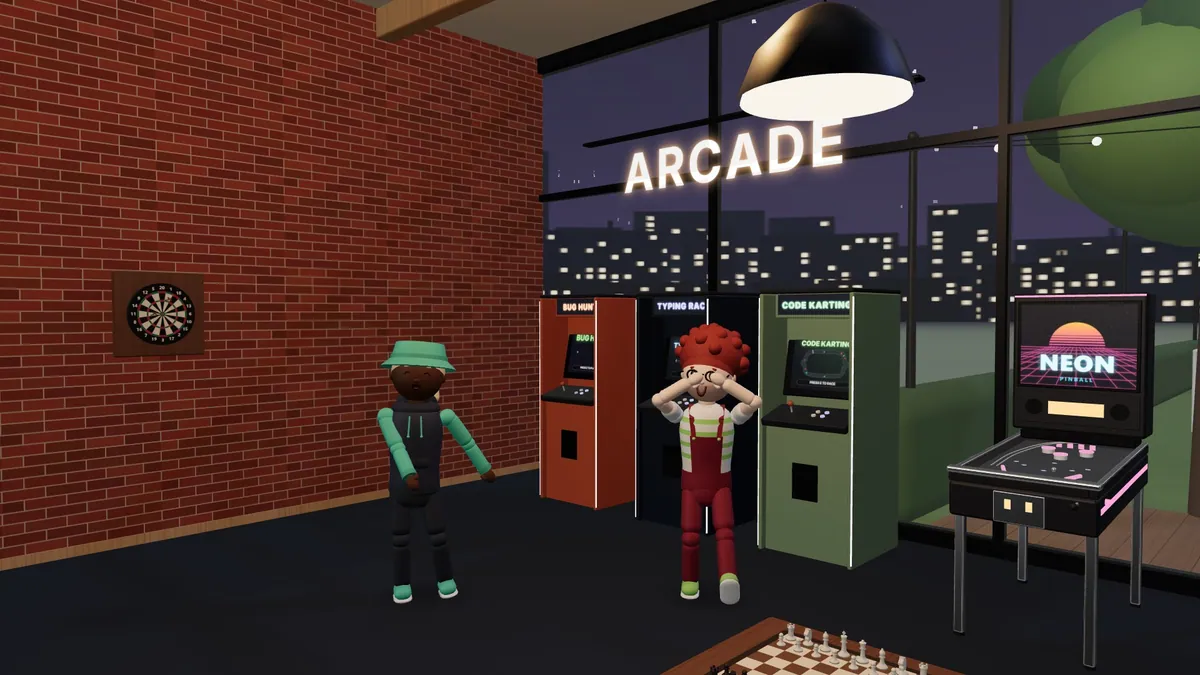
Bug Hunt, Code Karting, chess, darts and more, played in the world itself. Challenge anyone in the room, then celebrate in style.

  • Challenge anyoneSend a challenge from someone's card, or start a game and let the room join in.
  • Fair by designScores and results are decided by the server, never by what a player's app claims.
  • Seasons and badgesLeaderboards reset each month, and achievements mark the moments worth keeping.
  • Emotes and dancesFree emotes for everyone. Looping dances like these come with the Studio Pass, later.
Two people dancing in front of the arcade cabinets and a neon pinball machine.

The world builder

Make the studio yours

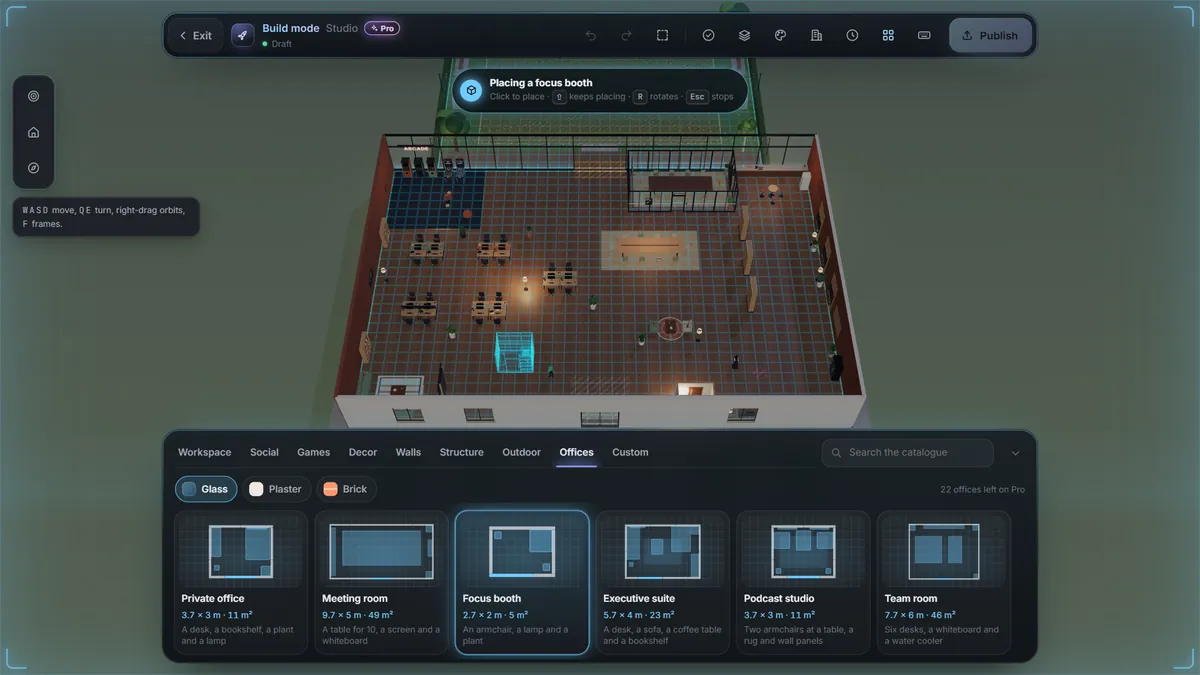
Rearrange everything in build mode, drop in a whole office from a preset, and publish while everyone watches the room change around them.

  • Hologram previewsItems glow green where they fit and red where they do not, with the reason spelled out.
  • Presets and templatesWhole rooms in one placement, complete studios to start from, and groups of items you save and reuse.
  • Publishing is a momentNobody is dropped: items dissolve, glide and materialise for everyone inside, and any version can be restored.
Build mode: the studio as a blueprint, with a Focus booth preset ready to place from the Offices tray.

Integrations

Plugs into the tools you already use

Each one belongs to you, not to a workspace. Your projects reach a workspace only when you share them, at the level you choose.

  • GitHub Lights up the studio Pushes, pull requests, issues, deploys, CI runs and releases
  • GitLab Lights up the studio Pushes, merge requests, pipelines, deploys, releases and issues
  • Vercel Lights up the studio Deploys, from start to success or failure
  • Coolify Lights up the studio Deploys, and incidents when an app goes down
  • Linear Lights up the studio Issues opened, started and done
  • Jira Lights up the studio Issues and comments
  • Slack Posts to a channel The studio posts deploys, releases, merges and agent results to a channel, plus a /devsyncora command
  • Discord Posts to a channel The studio posts deploys, releases, merges and agent results to a channel, plus a /devsyncora command
  • Any webhook Lights up the studio Deploys, CI runs and incidents from any other tool

And the rest of the studio

Built for how people actually meet

The world and presence

A studio that is always there

Desks, project stations, a lounge, a coffee bar, an arcade, an agent bay and a courtyard. Walk up to people instead of pinging them.

  • Walk over, wave, knockWave, knock with "Got a sec?", leave a sticky note on a desk or challenge someone to a game.
  • Presence that means somethingYour status follows what you are doing: talking, playing, away. Work signals only show if you opt in.
  • A desk of your ownYour monitor shows the projects you share. Decorate the desk, some pieces unlocked by achievements.

Voice

Talk like you are in the room

People near you hear you, walls muffle it and tables form bubbles. Push to talk is the default, your microphone is only asked for the first time you talk, and nothing is recorded.

  • HuddlesInvite a few people into a huddle and hear each other wherever you stand.
  • Screen sharingShare with your huddle, with people nearby or on a screen in the world. Video only, never recorded.
  • Your mix, your rulesSet anyone's volume, mute someone just for you, or block them: a block silences both ways.

Games

An arcade in the office

Every game is played in the world itself: on the real board, the cabinet, the whiteboard or the pitch, with everyone free to watch.

  • Bug Hunt

    1-8 players 90 s rounds

    Bugs are loose in the courtyard. Squash the most in 90 seconds.

  • Typing Race

    1-6 players

    Race to type a real-looking code snippet. Clean, fast fingers win.

  • Darts

    1-4 players

    Three rounds, three darts each. Steady your hand and go for the treble 20.

  • Chess

    2 players

    A proper game at the chess table. Optional clocks, no takebacks.

  • Dev Trivia

    2-8 players

    Ten quick questions on code, Git, the web and dev culture, on the lounge TV.

  • Code Karting

    1-8 players 3 min rounds

    Three laps round a circuit shaped like code. Dodge the syntax errors, ride the merge conflicts.

  • Project Pictionary

    3-8 players

    Sketch a dev term on the whiteboard while everyone races to guess it.

  • Office Football

    2-10 players 3 min rounds

    Two teams, one courtyard ball, three minutes. Level at the whistle? Golden goal.

  • Commit Guessing

    2-8 players

    A real commit message on the lounge TV: whose is it, and which project? Eight rounds.

  • Desk Chair Racing

    1-6 players 3 min rounds

    Exactly what it sounds like: laps round the studio on office chairs. Push off, drift, twirl, bump.

  • Table Tennis

    2 players

    A quick rally at the ping-pong table: first to 11, two clear, with real spin.

  • Drone Racing

    1-8 players 3 min rounds

    Thread a racing drone through hoops over the desks and under the rafters. Boost, bump, beat the clock.

  • Robot Battles

    2-4 players 90 s rounds

    Program a robot with simple rules, then watch it fight in the ring: lasers, shields, sparks and a last robot standing.

Offices

Rooms with real doors

Build private offices, meeting rooms, focus booths and podcast studios, then choose who may walk in. Closed means closed: chat and voice stay inside.

6 kinds of room, a preset for each

  • Private office A desk of your own behind a door.
  • Meeting room A table, a screen and room for the team.
  • Focus booth One seat, no distractions.
  • Executive suite A big desk, a sofa and a view.
  • Podcast studio Mics, soft seats and quiet walls.
  • Team room Desks for a squad and a whiteboard.

4 ways in

  • Open Anyone in the studio can walk in.
  • PIN code People who know the PIN, or hold a key, can walk in.
  • Keys only Only people you give a key to can walk in.
  • Locked Only the owners. Keys are paused; others can knock.
  • 5 wrong PINs in a row lock the keypad for 60 seconds, and PINs are stored only as a hash.
  • A correct PIN or an answered knock lets you in for 30 seconds.
  • Every plan has offices (2, 8, 24 on Free, Plus and Pro), and every access mode works on every plan.

Emotes and the Studio Pass

Say it without typing

Free emotes for everyone on keys 1 to 8. The Studio Pass, coming later, adds expressions and looping dances, yours in every studio you visit.

Free for everyone

  • Wave
  • Celebrate
  • Thumbs up
  • Shrug
  • Facepalm
  • Dance
  • Point

With the Studio Pass, coming later

  • Clap
  • Bow
  • Salute
  • Laugh
  • Mind blown
  • Heart hands
  • Nae Nae
  • Whip
  • Dab
  • Floss
  • Griddy
  • Shoot
  • Woah
  • Running Man
  • Sprinkler
  • Robot
  • Macarena
  • Cabbage Patch
  • Moonwalk

Dances loop until you move, sit or emote again, for up to 20 seconds.

Communities and Discover

Open the doors, if you want to

Everything is opt-in and off by default. A listed workspace appears in Discover with a public page that shows only what you choose to publish.

  • Three ways to joinInvite only, ask to join (an admin approves each request) or open to anyone who finds it.
  • Guest visitsSigned-in visitors can look around, chat and play, with no voice, no desk and no members-only data.
  • Room for membersSome places in the studio are always kept for members, however busy the visitors get.

See it for yourself

Open a studio, invite a friend and walk around.

  • Free plan, no time limit
  • Runs in your browser
  • Private until you share

A persistent 3D studio for developers and the people they build with.

In development, not released yet

© 2026 SyncFac (Pty) Ltd. Real activity builds the world.